Ace Trace - Shot Tracker
- 3.2
- Rating
- 100.00K
- Installs
- Free
- Price

 Analysis by App-foxy
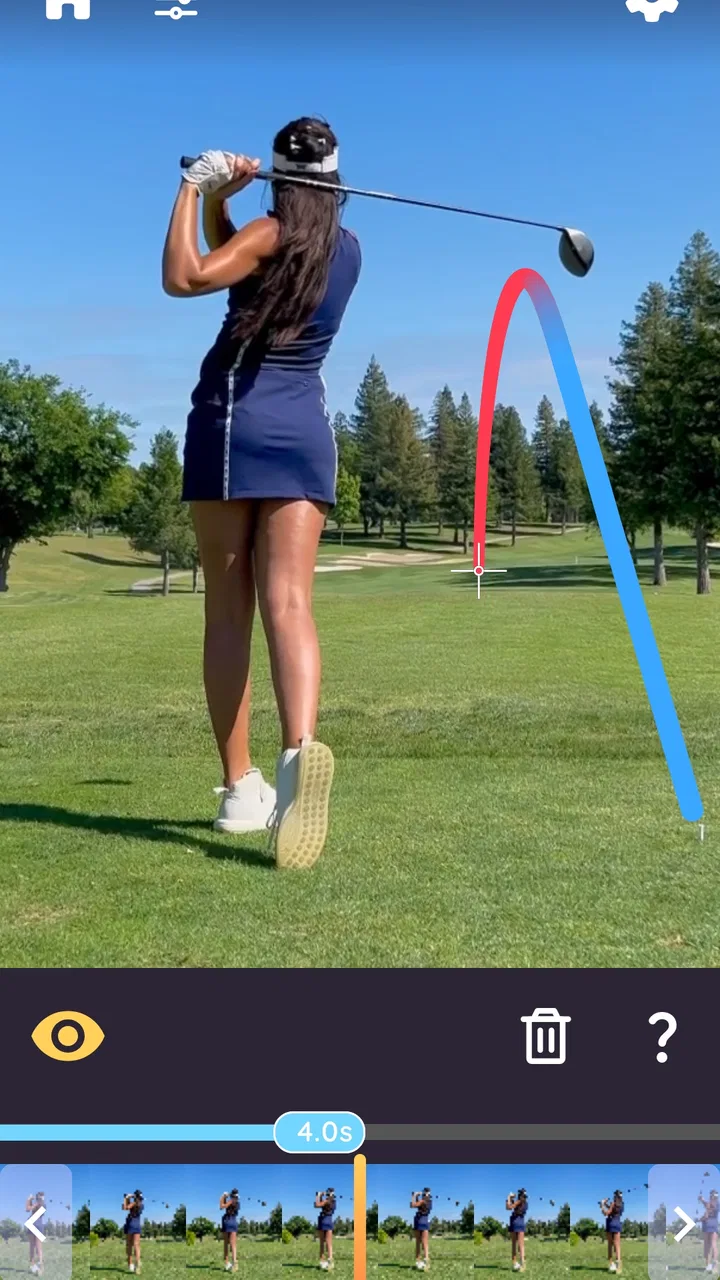
I approached Ace Trace - Shot Tracker as a practical sports video tool rather than a full coaching platform. Its main job is simple: help you trace the movement of a shot in recorded footage. That makes it interesting for golf, disc golf, baseball, and similar activities where the ball or disc can disappear against a bright sky, distant background, or fast camera movement. After spending time with it, I found the app most useful when I treated it as a visual review aid, not as an automatic replacement for technique, launch-monitor data, or a professional lesson.
The first thing to understand is the app’s place in the Sports category. It is a free app from Fitness & Sports apps, with optional purchases ranging from $0.99 to $69.99 per item. It is rated for Everyone, so the presentation is approachable, but the usefulness depends heavily on the quality of the footage you give it. A well-framed clip can become a clear teaching reference; a shaky or poorly timed recording can leave you with a result that is difficult to trust.
How I built a reliable baseline workflow
My best results came from keeping the process deliberately boring. I first recorded the action with the phone held as steadily as possible, then opened the clip in Ace Trace and worked through the tracing process without trying to correct every detail at once. The important habit is to review the original video before editing. If I could not clearly identify the moment of contact or release, I did not expect the app to rescue the clip later.
You May Also Like

 Blood Strike: 2.5 Anniversary
Blood Strike’s Loadouts Turn Every Drop Into a Tactical Gamble
A close look at Blood Strike’s custom loadouts: how fast access to signature weapons reshapes its battle royale rhythm, rewards preparation, and narrows the gap between fights.

 Pandora - Music & Podcasts
Pandora’s Music Is Easy to Start, but Harder to Recover
Pandora’s strength is its low-effort path from a seed to a station. Its weak spot is how much confidence it asks you to place in connection, setup, and quiet recovery.

 8 Ball Pool
 Is Built on Rivalries, Rematches, and Routine
A close look at the rivalries, rematches, shared routines, and unanswered safety questions that turn a quick pool match into a persistent mobile community.

 Samsung Music
’s Quiet Strength Is Playing What You Already Own
Its reach comes less from spectacle than from dependable access to a personal library. That simplicity is both the app’s strongest retention engine and its ceiling.

 AccuWeather: Weather Radar
AccuWeather Review: A Quick, Clear Forecast for Everyday Decisions
For everyday plans, the best forecast is the one you can understand quickly. AccuWeather makes rain timing, radar, and local conditions easy to act on, with a few trade-offs.

 Hill Climb Racing
Why Hill Climb Racing Still Turns Crashes Into One More Run
A tiny car, a bumpy hill and one more upgrade: Hill Climb Racing keeps resurfacing because its simple chaos makes every near-miss feel personal.
More From Our News Desk



For golf, that means planning the camera position before the swing rather than chasing the ball after it has left the club. A stable view of the landing area is usually more valuable than a dramatic close-up of the backswing. With disc golf, the same principle applies: keep enough of the flight path in view to make the trace meaningful. Baseball footage benefits from a clear view of the pitch or hit, but a crowded background can make a fast ball harder to follow.
I also learned to separate two questions that are easy to confuse. The first is whether the trace looks visually convincing. The second is whether it helps me understand the shot. A polished-looking line is not automatically a precise measurement of the real path. I use the overlay to discuss shape, direction, and the broad outcome of a shot, while leaving exact speed, spin, distance, or launch information to equipment designed to capture those things.
A useful everyday scenario is a weekend practice session with a friend. One person records several swings from the same position while the other hits, and the clips are reviewed later rather than interrupting every attempt. Ace Trace can make the successful and unsuccessful shots easier to compare, especially when the ball vanishes quickly. The repeatable camera angle matters more than adding decoration to a single clip, because consistency turns separate videos into a small visual record.
That workflow also answers an important practical question: is the app suitable for sharing a shot? Yes, it can be useful when the goal is to make the flight easier for another person to see. I would still review the finished result before sending it, particularly when the background is busy or the action moves behind an obstruction. If the trace does not follow the shot naturally, I would rather discard the clip than present an uncertain overlay as proof.
Why the source video matters more than most beginners expect
Lighting is not just a cosmetic concern. A dark ball against trees, a white disc against clouds, or a baseball crossing a bright patch can all reduce the visual information available to the tracing process. I found it better to choose a background that contrasts with the object and to avoid placing the subject directly in front of clutter whenever possible.
Timing is equally important. Starting the recording too late can remove the release or impact moment, while stopping too soon can hide the finish of the flight. I prefer leaving extra footage before and after the action, then trimming my attention to the useful portion inside the app. This creates a little more work, but it gives me room to inspect what happened instead of forcing a guess from a few frames.
Phone movement is another hidden trade-off. Panning can be necessary when the shot travels a long way, but sudden movement makes the scene harder to interpret. For short practice shots, a fixed phone is usually the safer choice. For longer flights, I try to move smoothly and keep the object in a predictable part of the frame. The goal is not cinematic video; it is a continuous view that leaves the shot understandable.
Settings and choices worth checking before every session
Ace Trace is easier to use when I make a few decisions before opening a large batch of clips. I choose the sport or activity that best matches the footage, select the clearest recording, and decide whether the result is for private analysis or sharing. That last choice affects how much time I spend refining the presentation. A personal practice clip only needs to be readable. A clip sent to a coach or friend deserves a careful check for distracting errors.
The app covers golf, disc golf, baseball, and other sports and activities, but I would not assume that one tracing approach behaves identically across all of them. A golf ball may travel on a high arc, a disc can remain visible for longer while changing orientation, and a baseball may move so quickly that a small recording mistake becomes significant. I treat the category selection as a starting point, then judge the result against the actual footage rather than expecting identical performance.
One setting-related habit has helped me avoid wasted effort: I test a short clip before processing an entire session. If the camera angle, contrast, or timing is poor, discovering that after several videos is frustrating. A quick trial shows whether the chosen material is worth continuing with. This is especially useful when recording in changing light, because a position that worked early in the session may become less suitable later.
It is also worth checking the finished overlay at normal viewing size, not only while zoomed in during editing. A line that seems perfectly aligned when enlarged may look offset or confusing on a phone screen. Conversely, a small imperfection may not matter if the trajectory remains obvious. I judge the result by the way a normal viewer will see it, because that is usually the real purpose of adding a trace.
The current version is 3.26, and the app requires iOS 11 or later. That makes it accessible to many users with older compatible devices, although the experience can still vary with camera quality, processing ability, and available storage. I would keep the original clips until I had checked the exported or saved result. This simple precaution protects against making a decision based on a preview that looked better than the final copy.
How I handle optional spending
The free entry point is helpful because I can determine whether the workflow fits my sport before paying for anything. Optional purchases are available from $0.99 to $69.99 per item, so I would not buy a higher-priced option merely because I wanted one impressive clip. I would first establish a repeatable use: regular practice reviews, a series of comparison videos, or a consistent way to explain shots to friends.
That approach matters because the app’s value is cumulative. A single trace can be entertaining, but repeated footage from similar positions is where it becomes more useful. If I only record an occasional shot, the free experience may be enough to decide whether the visual effect is worthwhile. If I use it as part of a regular review routine, then I can judge optional purchases by how much time or flexibility they actually add to that routine.
I would also keep the distinction between convenience and accuracy in mind. Paying for an option does not change the physical information captured by a weak video. Better source footage remains the first investment. A stable phone position and a visible flight path will usually improve the usefulness of a clip more than spending money before the recording problem has been solved.
Faster patterns that make repeated practice less tedious
Experienced use is less about rushing through each clip and more about removing unnecessary decisions. I like to create a small recording routine: choose one camera position, record a defined group of attempts, and review them in one sitting. This prevents every shot from becoming a separate experiment with a different angle and makes comparisons much easier.
Another efficient pattern is to mark only the clips that answer a question. For example, I might want to compare a shot that finished left with one that finished straight, or examine whether two disc releases followed a similar early line. I do not need to trace every recording just because it exists. Selecting clips based on a clear question keeps the app from becoming a time-consuming archive of decorative overlays.
Short labels outside the app can help too. I might note the club, disc, pitch situation, or intended target in the filename or my practice notes, as long as I keep the system simple. The trace shows what happened visually, but it does not replace remembering what I intended to do. Combining the overlay with a brief note turns a clip into a more useful practice reference.
For sharing, I prefer one clear clip over a long sequence of nearly identical attempts. A friend can understand a single well-framed example quickly, while a large batch may hide the point I am trying to make. If I need to show progress, I choose comparable clips recorded from the same position. That gives the viewer a fairer comparison than placing unrelated angles side by side.
There is also a practical shortcut in deciding when not to edit. If the action is already easy to follow and the purpose is simply to remember the shot, the original video may be enough. I use Ace Trace when the path is difficult to see or when the overlay adds explanatory value. This keeps the app in its strongest role instead of turning every sports recording into a production task.
Where this differs from usual sports alternatives
Compared with a standard phone camera, Ace Trace offers a more direct way to show the path of an object after the shot. A normal video preserves the event, but the viewer may have to follow a tiny ball or disc frame by frame. The tracing approach is more immediate, particularly for casual coaching between friends or for sharing a memorable attempt.
Compared with a launch monitor, dedicated baseball tracker, or formal analysis system, it is much lighter. Those alternatives may be preferable when the priority is measured performance data, repeatable technical metrics, or detailed professional analysis. Ace Trace is better suited to visual communication: showing where the shot went, discussing its broad shape, and making a hard-to-see flight visible.
It also differs from a generic video editor. A general editor may offer more control over cuts, titles, audio, and presentation, but it does not necessarily make the flight path the central object of the review. I would choose a normal editor when I am producing a broader sports video, and choose this app when the trajectory itself is the message.
Advanced limits I would keep in mind
The biggest limitation is that the app depends on what the camera captured. Occlusion, poor contrast, rapid motion, and unstable framing can all make a trace less dependable. This is not a criticism unique to one screen or one button; it is the basic trade-off of using ordinary video to interpret fast outdoor action. The more difficult the scene, the more cautious I become about treating the overlay as evidence.
Perspective can also mislead. A shot that appears to curve strongly from one camera position may look different from another angle. The trace can communicate the view from the recording position, but it should not be mistaken for a complete three-dimensional reconstruction. This is particularly important when discussing technique. I would use it to start a conversation, not to make a confident diagnosis from a single clip.
There is a similar limitation with distance. A visual line can show direction and general shape, but it does not automatically tell me how far the object traveled or how fast it moved. If those are the questions I need answered, I would use the appropriate measuring equipment or course information alongside the video. Ace Trace is strongest when the question is “Where did it go?” rather than “What exact physical values produced that result?”
The app may also feel too narrow for users who want a complete training log. It does not replace a structured practice journal, a range-management system, or a coaching relationship. Someone looking for club selection history, detailed statistics, or long-term performance dashboards should consider another tool. I would skip it entirely if my main goal is numerical analysis and I had no interest in reviewing visual flight paths.
Privacy and organization deserve ordinary attention whenever personal videos are involved. I keep track of which clips I want to retain and which are disposable, and I review a shared result before sending it. That is not a special feature claim; it is simply good practice when an app becomes part of a regular recording habit. The more often I film, the more important it becomes to avoid creating a confusing pile of nearly identical clips.
Who will get the most from it
I think the strongest audience is recreational players who already record their swings, throws, or hits and want an easier way to see the result. It is also useful for friends who teach one another informally, because a visible path can make a discussion clearer than words alone. Beginners may enjoy the immediate feedback, while experienced players can use repeated, consistent recordings to compare outcomes.
It is less suitable for someone who rarely records video, plays in conditions where the object is almost impossible to see, or expects automatic coaching. It is also not my first recommendation for a serious athlete who needs validated measurements. In those cases, the app can still be a supplementary visual aid, but it should not be the main analysis system.
The Everyone rating makes the app approachable for mixed-age households and casual sports groups, but ease of access should not be confused with effortless results. A younger player may be able to open it quickly, yet still need help positioning the phone and choosing a useful clip. The quality of the setup determines much of the experience.
My mastery verdict after using it as a habit
Ace Trace - Shot Tracker works best when I use it with discipline: record from a sensible position, preserve the full action, select clips that answer a real question, and treat the trace as visual guidance rather than laboratory measurement. That combination turns a simple idea into a useful part of practice. Without those habits, it can feel like an attractive overlay added to footage that was never suitable for analysis.
The app has attracted over one hundred thousand installs, while its average rating sits at 3.2 from around one thousand three hundred ratings. I read that mixed reception as a reminder to set realistic expectations. The concept is easy to appreciate, but the results naturally depend on sport, lighting, camera movement, and the visibility of the shot. Users who understand that relationship are more likely to enjoy it than users expecting perfect automatic tracking in every clip.
For me, the strongest reason to keep it available is communication. When a ball or disc disappears in ordinary video, the trace can make the moment understandable to someone who was not standing beside me. That is valuable for a quick lesson, a friendly comparison, or a personal record of a memorable attempt. The app’s free starting point makes that experiment easy, although the optional purchase range means I would evaluate paid choices against regular use rather than curiosity.
I would recommend trying it if you enjoy golf, disc golf, baseball, or related activities and already have a habit of filming practice. Start with one stable camera angle and a handful of clear clips. If the overlays help you notice patterns that were previously hard to see, continue building the routine. If you need exact numbers, automatic coaching, or a full performance database, choose a specialized alternative instead.
My final view is positive but measured. This is a focused Sports app, not a complete training ecosystem, and its current version 3.26 does not change that basic identity. Used thoughtfully, it gives ordinary phone footage a practical visual layer. Used carelessly, it can encourage more confidence in the trace than the recording deserves. I would recommend it to the right user: someone who wants clearer shot storytelling and is willing to make the camera setup part of the practice.
FAQs for Ace Trace - Shot Tracker
01What is Ace Trace - Shot Tracker used for?
Ace Trace - Shot Tracker is designed to help golfers review and improve their shots using video-based analysis. It can track the flight of a golf ball, display useful information such as distance and trajectory, and make practice sessions easier to evaluate. It is especially useful for players who want visual feedback without relying exclusively on expensive launch-monitor equipment.
02How does Ace Trace - Shot Tracker track a golf shot?
The app generally uses your smartphone camera and visual tracking technology to follow the ball after you hit it. For the best results, the phone should be positioned where the ball remains visible and the recording area is not blocked by trees, people, or poor lighting. Accuracy may vary depending on camera quality, weather, distance, ball visibility, and the quality of your swing video.
03Do I need additional equipment or a subscription to use the app?
Ace Trace - Shot Tracker may work with a compatible smartphone and does not necessarily require a dedicated launch monitor for its basic video-tracking features. However, some advanced tools, detailed statistics, or premium analysis options may be restricted to a paid plan or in-app purchase. Before downloading, check the current App Store or Google Play listing for supported devices, pricing, and subscription terms.
04Is Ace Trace - Shot Tracker suitable for beginners?
Yes, the app can be helpful for beginners because it turns ordinary practice videos into easier-to-understand visual feedback. New golfers can use it to see whether shots are curving, compare attempts, and identify patterns over time. It should not be treated as a replacement for professional coaching, though, since automatic tracking can occasionally misread a shot and cannot explain every technical swing problem.
05What should I know about privacy and recording requirements?
Because Ace Trace - Shot Tracker relies on video and camera-based analysis, it will usually need permission to access your device camera and possibly your photo or video library. Review these permissions before using the app, particularly if you record at a public course. Avoid capturing other golfers without permission, and check the developer’s privacy policy to understand how uploaded videos, account information, and usage data are handled.
Pros
- Tracks shot locations and distances to support smarter club selection.
- Visual shot maps make it easy to review rounds and identify patterns.
- Useful for golfers who want measurable progress beyond basic scorecards.
- Simple interface keeps round tracking quick and relatively distraction-free.
- Can help reveal recurring misses and course-management weaknesses.
Cons
- Accurate tracking depends on precise GPS data and correct shot marking.
- Manual input may feel inconvenient when playing quickly or with a group.
- Battery and location use can be demanding during a full round.
- Advanced analysis may be less useful for casual golfers.
- Some features or content may require a subscription or in-app purchase.

Ace Trace - Shot Tracker
Gallery